Batteribevis for Tesla
Sell your Tesla with its battery documented.
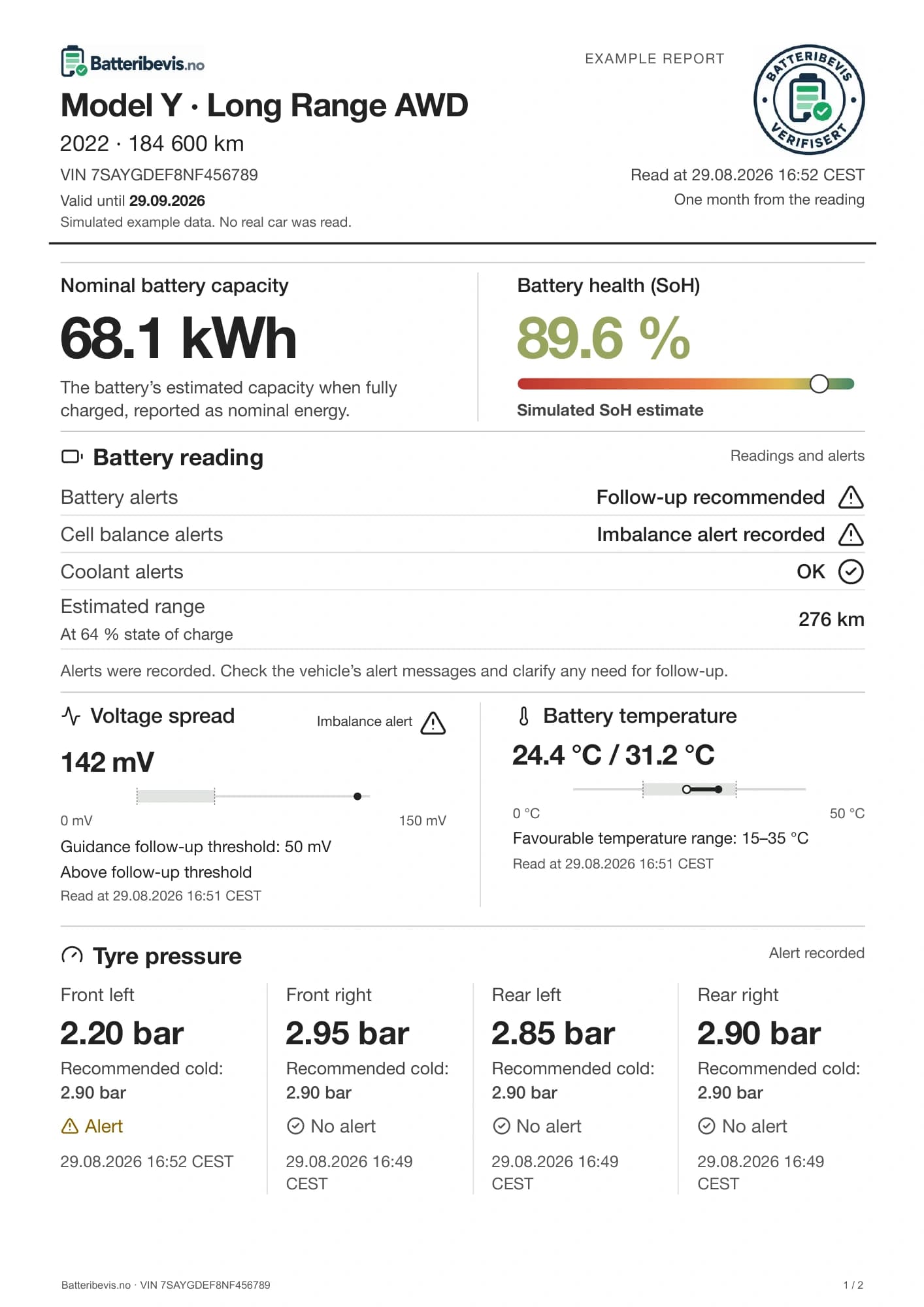
A dated battery report gives the buyer an overview of battery capacity, battery alerts and tyre pressure. Komplett also includes motor and drivetrain alerts, charging information and battery diagnostic checks.
From NOK 699, including VAT. PDF and shareable link · No subscription
 Open the report
Example report with simulated data
Reports delivered for
- 2018 Model X
- 2021 Model 3
- 2026 Model 3
PDF by emailReady to attach to your listing
A link to shareNo account needed for the buyer
One payment per carShare with all prospective buyers
View the report
What your buyer can see.
Open the report to see what is included. Checkpoints show the vehicle’s alerts, and charts put readings in context.
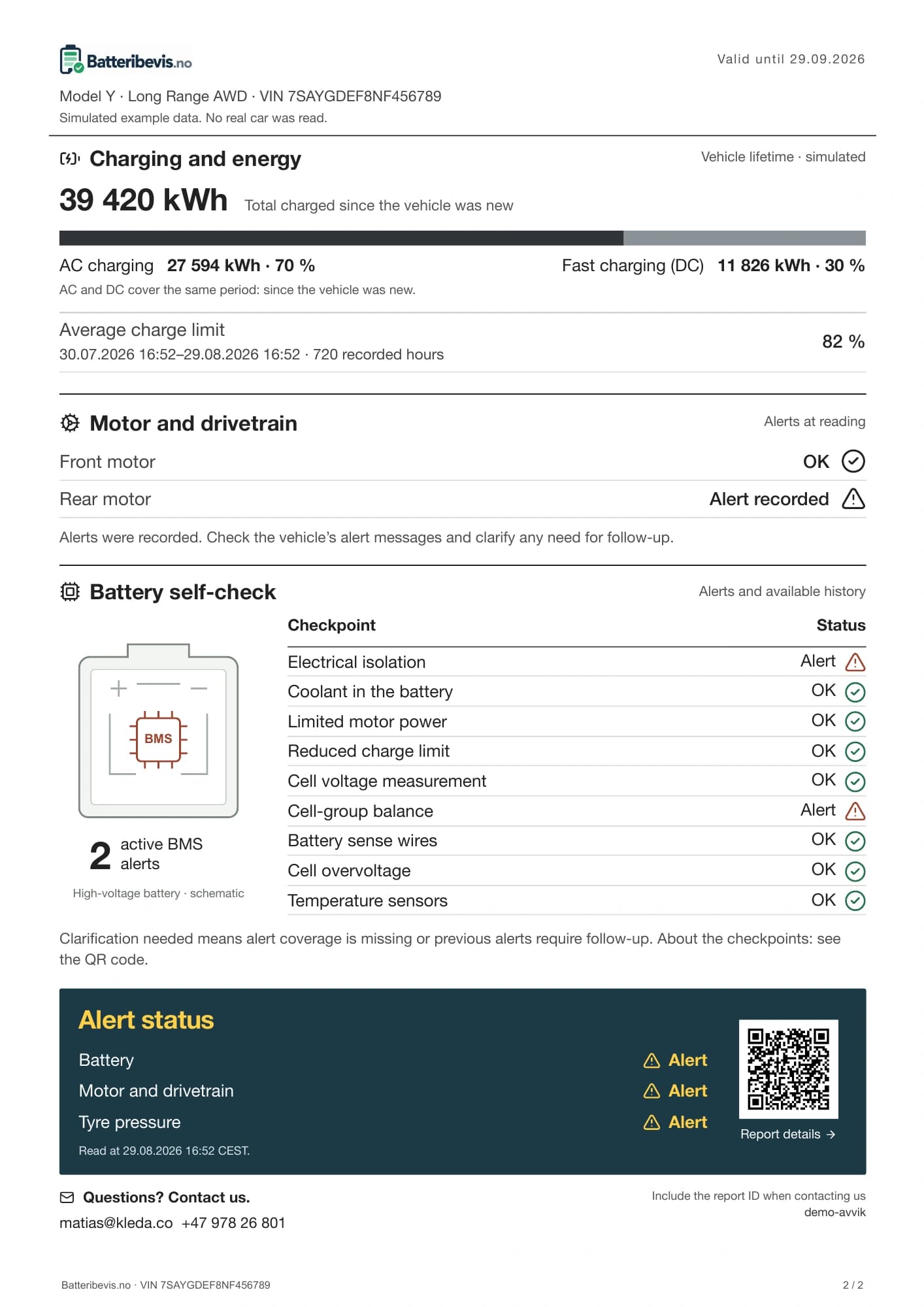
View motor alerts, charging and battery diagnostics.
Komplett shows motor alerts, charging history and battery checkpoints. The QR code opens readings and explanations.
- Motor alerts and available history
- Total charged energy split into AC and DC
- Battery diagnostic checks, point by point
SoH and other values in the example report are simulated. They demonstrate the layout, not a real vehicle’s results. SoH is a preliminary estimate when the calculation inputs are available.
From order to car listing
Three steps to your report.
You order online. We read and review the available data, then send the report by email.
- 01
Choose a report and pay
Choose Basis or Komplett, sign in with Tesla and pay for your selected report.
- 02
Approve access with Tesla
After payment, Tesla will email you, usually within one hour during daytime. Follow the link and approve access to the vehicle.
- 03
Receive your report by email
Once access is approved, we read the car and prepare the report. We email the PDF and shared link when it is ready.
Choose a report for your car sale
Basis or Komplett.
Compare the contents and choose the report that fits. You receive a PDF and report link by email.
NOK 300 more for Komplett. Motor alerts, charging history and detailed battery checks on page 2.
Prices in NOK. Pay in your local currency where offered by Stripe, or choose NOK. The exchange rate includes a conversion fee, usually 2–4%.
| What would you like to document? Basis covers the battery and tyre pressure. Komplett adds motors, charging and battery diagnostic checks. Price per car · Including VAT | Basis699 NOK Your battery and tyre pressure documented. | Komplett999 NOK Adds motors, charging and battery diagnostics. |
|---|---|---|
| Battery capacity | Included | Included |
| SoH estimate when supported by the data | Included | Included |
| Battery self-check | Included | Included |
| Cell data and battery temperature | Included | Included |
| Tyre pressure and alerts | Included | Included |
| PDF and report link by email | Included | Included |
| Motor self-checks | Not included | Included |
| Reported AC and DC charging counters | Not included | Included |
| Average charge limit where history is available | Not included | Included |
| Battery diagnostic checks, point by point | Not included | Included |
| QR code for readings and explanations | Not included | Included |
Our current Tesla connection supports the European service region. Contact us before ordering for a car outside Europe.
Before you order
Questions you
might have.
Batteribevis is provided by Kleda Gruppen AS. About us and the report
Will I get a battery health percentage?
SoH describes the battery’s estimated remaining capacity compared with when it was new. A percentage is shown when the vehicle provides the inputs needed for the calculation.
Read about battery health and SoHWhen and how will I receive my report?
Choose a report, sign in with Tesla and pay. Tesla will email you to approve vehicle access, usually within one hour during daytime. Once approved, we prepare the report and email the PDF and shared link.
Which Tesla vehicles can get a report?
Sign in with Tesla to see the vehicles you can select. The report uses the data Tesla makes available for your chosen vehicle.
What do the status marks mean?
OK means the available vehicle data shows no relevant active alerts or unresolved historical findings for that checkpoint. Findings are clearly marked so you can see what may need follow-up.
Report coverageIs the example report from a real car?
The example uses simulated data to show a completed report with alerts and findings. Your report is based on readings from the vehicle you connect.
View an example with alerts